Auto Structure Read
Type a symbol. Claude rebuilds the Auto Market Structure & Liquidity readings on 1H, 4H, 1D and 1W: Dow structure with BOS and CHoCH, the Protected level, the Fibonacci leg, the Bottom-out areas (recovery depth of a down leg), liquidity sweeps and the v5 volume layers, then explains the structure by principle in a chat summary and an HTML report with a structure map. v0.4 adds how the timeframes nest, the distance to every state-change level and the age and size of the current leg. Full mode (v0.5) also rebuilds the indicator's 12-state dashboard.
It describes state only. No buy or sell calls, entries, stops or targets. You make every decision.
autostruct-read-en BTCUSDWhat it does
Structure on four timeframes
Uptrend or Downtrend per timeframe with BOS and CHoCH, the Protected level and its distance in ATR, and how the timeframes line up, with the chart timeframe nested in the next higher leg.
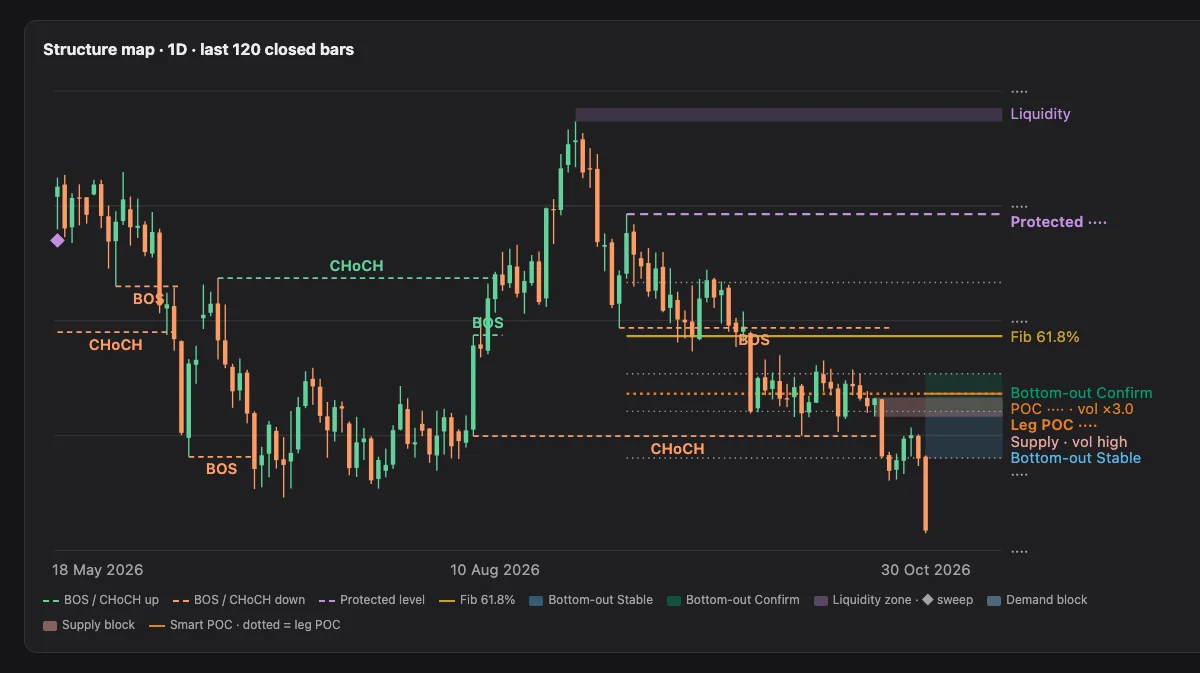
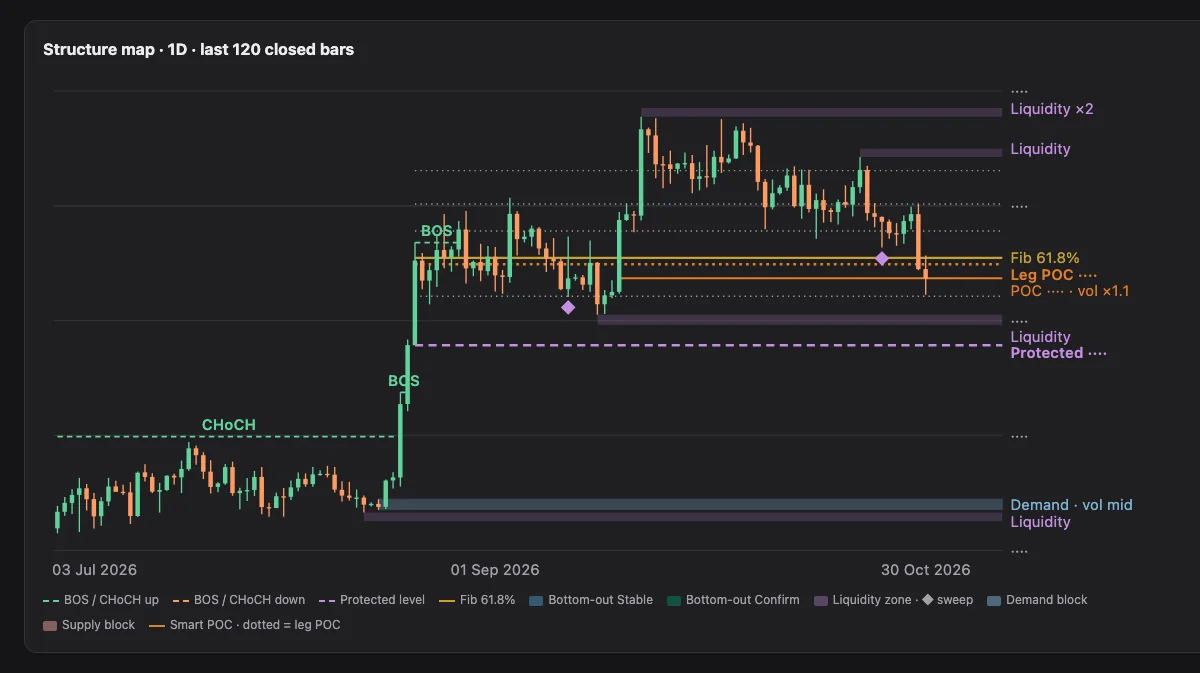
Structure map
The last 120 closed bars of the chart timeframe with swings, the Protected level, liquidity zones, Bottom-out areas and the volume layers on one chart.
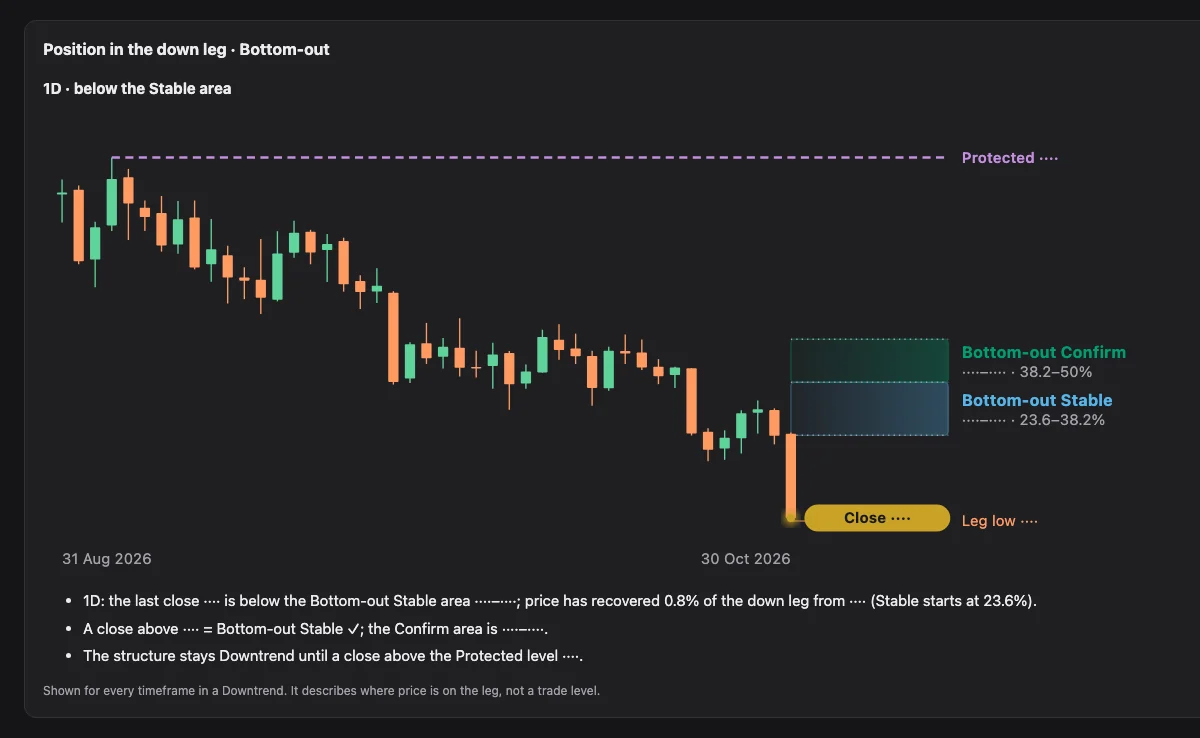
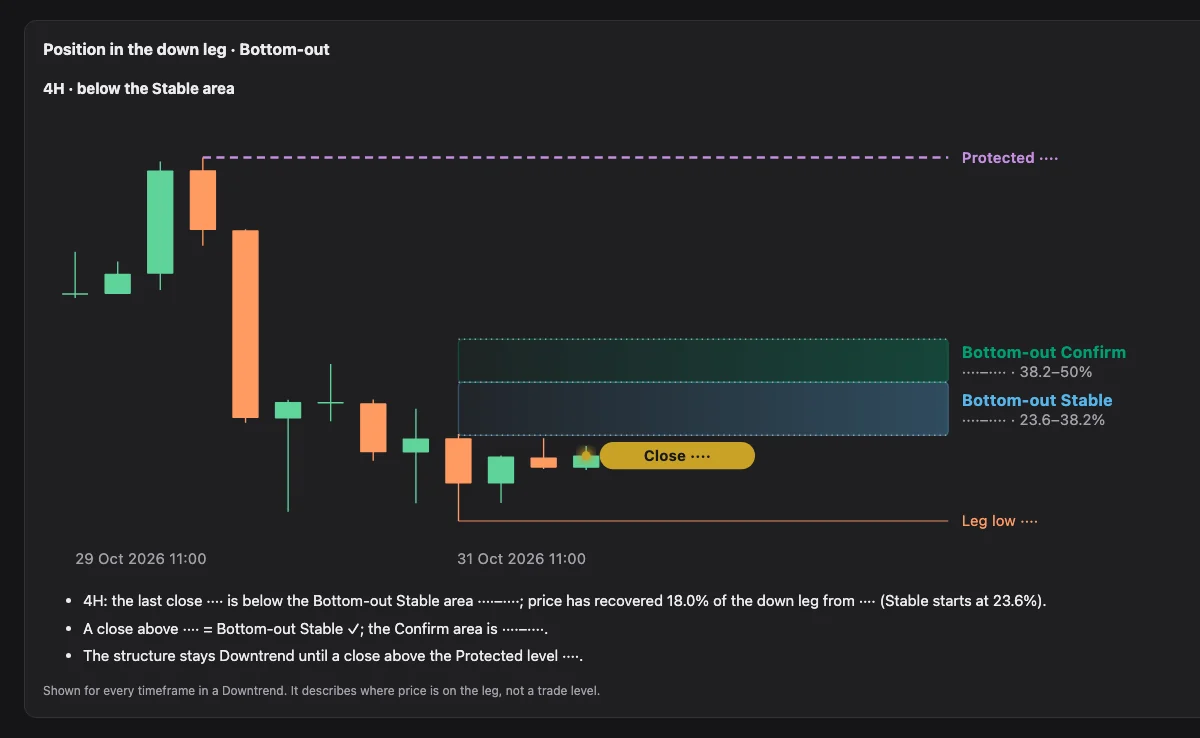
Position in the leg
Where the close sits in the current leg: the share recovered, the Bottom-out Stable and Confirm areas (depth marks, not Fibonacci support), and what a close above each one means.
Liquidity and sweeps
Equal highs and lows, the zones price is drawn to, and the sweeps that already happened.
Volume layers (v5)
Order blocks with the volume traded inside them, the leg volume profile with POC and 70% value area, and Smart POC levels, when the bars carry volume.
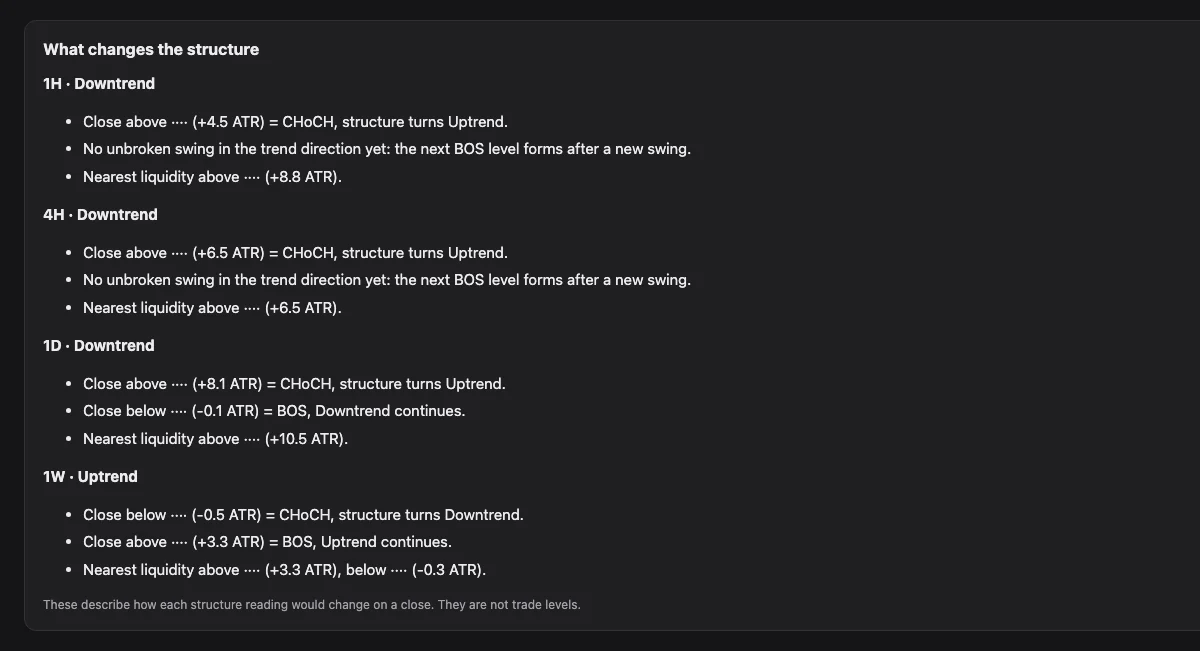
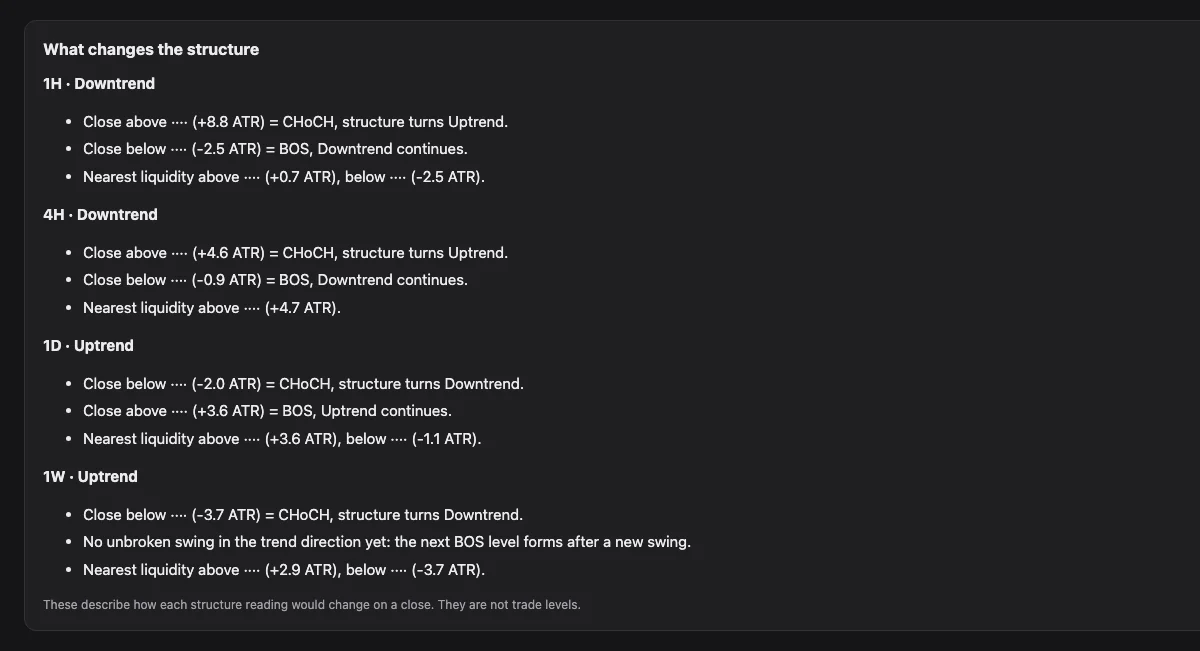
What changes the structure
Prices where a close turns the structure (CHoCH), continues it (BOS) or completes a Bottom-out. They describe state, not trade levels.
Leg age and size
How many bars the current leg has run and how tall it is, set against the symbol's own completed swing legs.
Dashboard · 12 states (full mode)
Add full to the command and the report rebuilds the indicator's 待 WAIT / 構 READY / 流 TREND dashboard per timeframe: the state, its age, the Reason, the HTF row, the levels and a 120-bar state strip. The states are names for what price has been doing on closed bars, never a signal.
Install
About two minutes. No API keys, no packages.
Claude (web / desktop)
- Download autostruct-read-en.zip from this page. Keep it zipped.
- In Claude, open Settings → Capabilities and turn on Code execution and file creation (newer layouts: Create and edit files).
- Go to Customize → Skills, click + → Create skill → Upload a skill, and choose the zip.
- Make sure the skill is switched on. For the easiest data route, also add the TradingView connector.
Team or Enterprise: an owner must allow Skills and Code execution first.
Claude Code
- Unzip autostruct-read-en.zip.
- Copy the folder so the file sits at the path below.
- Start Claude Code and type a command, for example autostruct-read-en XAUUSD.
~/.claude/skills/autostruct-read-en/SKILL.mdTo update: remove the old skill, then upload the new zip (or replace the folder in Claude Code).
First run
- Type autostruct-read-en and a symbol. Add the exchange when the name is ambiguous, for example OANDA:XAUUSD.
- The report opens with a QUICK MODE or FULL MODE badge that shows the settings used: swing size 2.0 × ATR(14) and Style Auto. Check that they match your Auto Structure inputs.
- If they differ, say so (for example swing 2.5, or Style Swing) and the skill runs again.
Defaults: quick mode, chart timeframe 1D, 300 bars per timeframe, swing size 2.0 × ATR(14), Style Auto. Full mode fetches about a year of bars (1H 2000 · 4H 800 · 1D 600 · 1W 300), so it takes longer, and uses the indicator's dashboard defaults: Market Classic, Pullback ATR / Mid, ER 0.30, holds 3 / 3, smoothing 3. Every reading uses the last closed bar, like the indicator; a forming bar is shown as a Live line, not a reading.
Commands
autostruct-read-en <SYMBOL> [chart TF] [swing K] [style] [quick|full]autostruct-read-en BTCUSDChart TF 1D, swing 2.0 × ATR, Style Auto
autostruct-read-en OANDA:XAUUSD 4HSummary, map and change levels from the 4H structure
autostruct-read-en NYSE:BB 1D swing 2.5Swing size 2.5 × ATR, to match a chart that uses it
autostruct-read-en TFEX:S501! 1HChart TF 1H; the table still shows 1H, 4H, 1D and 1W
autostruct-read-en S50 fullFull mode: everything above plus the 12-state dashboard per timeframe
autostruct-read-en BTCUSD full market CryptoFull mode with the Crypto market window (Classic is the default; FX & Gold also available)
Plain words work too: "on 4H", "my swing size is 2.5", "Style Swing", and "full", "dashboard", "states" or "แบบเต็ม" for full mode.
Data routes
| Route | You need | You get |
|---|---|---|
| TradingView connectorrecommended | The connector added in Claude | Everything, with volume, and no need to open TradingView |
| CSV | Chart exports for 1H, 4H, 1D and 1W | Everything, from your files (keep the volume column for the volume layers) |
| Chart readadvanced | A TradingView desktop MCP that reads Pine tables | The real Structure row plus a parity check |
When it reads a chart, the skill only reads. It never changes your symbol, timeframe, layout, inputs, scripts, alerts or drawings.
Read the report
A sample report


OANDA:XAUUSD · 1D · Swing 2.0 × ATR · data through 31 Oct 2026 · Past data, illustrative only, not a trade idea. Price levels are cut out.
Settings badge and header
QUICK MODE or FULL MODE, swing size, Style, chart timeframe, the last price and the time of the newest bar. A ⚠ appears when the data is more than 4 days old.
Structure snapshot
One tile per timeframe: Uptrend or Downtrend, the distance to the Protected level in ATR, and an alignment sentence: how many timeframes read like the higher one and where the chart timeframe sits in the next higher leg.
Summary
The chart timeframe in four lines: structure since the last CHoCH, the leg and how much of it price has recovered, the Bottom-out areas, and the higher timeframe.
Dashboard · 12 states (full mode)
Per timeframe: State, State age, Reason, HTF, Move, Structure, Levels and Preset, with a strip of the last 120 closed bars coloured by state. The states name what price has been doing; they are not signals.
Structure map
The last 120 closed bars with swings, the Protected level, liquidity zones, Bottom-out areas, order blocks, the leg POC and Smart POC levels.
Structure by timeframe
Since CHoCH, BOS count, the last four swings (HH, HL, LH, LL), leg position, leg age · leg size against the symbol's own swing legs, and the last closed bar of each timeframe.
Recent events
BOS, CHoCH and sweeps across all timeframes, newest first.
What changes the structure
Per timeframe: the nearest change line first, then the close that makes a CHoCH and the close that makes the next BOS, each with its distance in ATR and in the 1D ATR (ATR_D), and the nearest liquidity. State, not trade levels.
Position in the down leg · Bottom-out
For every timeframe in a Downtrend: below Stable, inside Stable, inside Confirm or above Confirm ✓, with a candlestick chart.
Volume layers
One chart per timeframe: the leg volume profile (24 rows) with POC and 70% value area, order blocks with their volume rank and Smart POC levels.
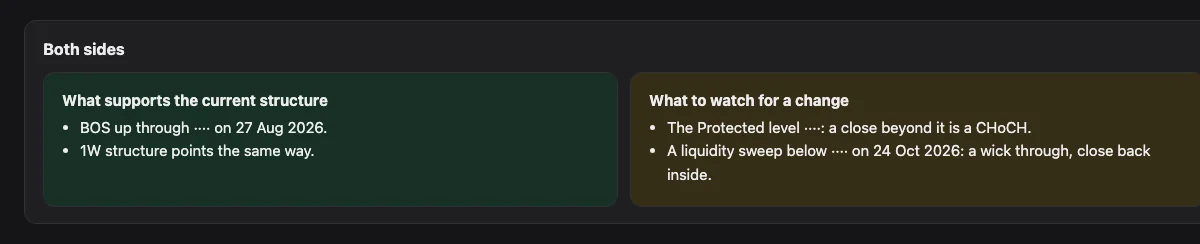
Both sides
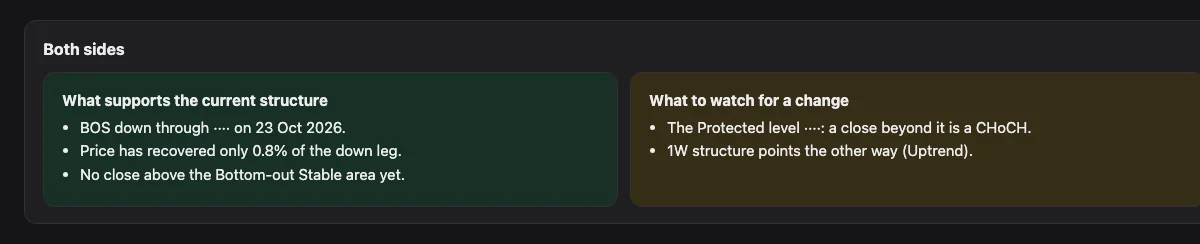
What supports the current structure and what would change it, equal in weight, then a learning note.
Volume layers are reference levels that describe where the leg traded, not turning points. Print the page to PDF from your browser if you need a file.
Settings file
config.yaml in the skill folder holds your defaults. Edit it before zipping, or simply say the setting in your request.
chart_tf: 1D                     # timeframe the summary, map and change levels use
dashboard_tfs: [1H, 4H, 1D, 1W]  # structure table rows
bars: 300                        # per timeframe (quick mode)
swing_k: 2.0                     # indicator input "Swing size (× ATR)"
style: Auto                      # Auto | Scalp | Swing | Position
symbol_defaults:                 # skip the exchange question
  XAUUSD: OANDA:XAUUSD
  BTCUSD: BITSTAMP:BTCUSD
  S50: TFEX:S501!
mode: quick                      # quick | full
market: Classic                  # Classic | Crypto | FX & Gold
Troubleshooting
- The skill does not start
- Check it is switched on in Customize → Skills and that code execution is on, then start a new chat.
- "No data route available"
- Add the TradingView connector, or attach CSV exports for 1H, 4H, 1D and 1W.
- Levels differ from my chart
- Check the symbol and exchange, the swing size and Style, and whether the bar is still forming. The skill reads closed bars only: after the session close the day's bar counts as closed, and once the week's trading is over the week's bar does too.
- No Volume layers section
- The bars had no volume column. With the connector, volume comes with the bars; with CSV, keep the volume column in the export.
- Full mode shows "1M n/a" in the 1W HTF row
- The monthly history was too short for the higher-timeframe row of 1W. The rest of the dashboard is unaffected.
- A ⚠ data warning
- The newest bar is more than 4 days old. Run again so the skill fetches fresh bars.
- Upload error
- Upload the zip as downloaded, and do not rename the folder inside it.
Questions
- Does it give buy or sell signals?
- No. It reads structure by principle. A built-in check blocks advice words before anything is shown, and every report ends with a disclaimer.
- Do I need the indicator on my chart?
- No. The skill computes the structure itself from price data. Add Auto Market Structure & Liquidity on TradingView to see it and compare.
- Is the TREND / READY / WAIT dashboard included?
- Yes, in full mode: add full to the command (for example autostruct-read-en S50 full). Quick mode, the default, leaves the 12-state dashboard on the chart. With the optional chart read, full mode also compares the state cell with your chart.
- Which markets work?
- Anything with OHLCV data: forex, metals, crypto, stocks, indices and futures.
- Is my data sent anywhere?
- The scripts run inside Claude's code environment and make no network calls. Price data comes only from the route you use.
This skill is an educational tool. It describes the state of technical indicators by principle and is not investment advice, a recommendation or a solicitation to buy or sell any instrument. Markets carry risk; past behaviour of an indicator does not guarantee future results. You are responsible for your own decisions.