Ichimoku Itto Read
Type a symbol. Claude rebuilds the Ichimoku Itto dashboard on 1H, 4H, 1D and 1W, adds the classic Ichimoku components, and explains the state by principle in a chat summary and a clean HTML report.
It describes state only. No buy or sell calls, entries, stops or targets. You make every decision.
ichimoku-itto-read-en BTCUSDWhat it does
Ichimoku Itto dashboard
Score, Zone, Kumo, the 1H / 4H / D / W rows and Trend, computed with the indicator's own rules.
Score breakdown
The five checks behind the Score: Kumo, Tenkan/Kijun, Chikou, future Kumo and Kijun slope.
Classic Ichimoku
Price vs Kumo, Tenkan vs Kijun, Chikou, future Kumo and Sanyaku 三役 on each timeframe.
Marks and magnets
The last Strong Up / Down and 3/3 Aligned marks, plus flat Kijun and Span B levels.
Change points
Prices where a component would change state. They describe state, not trade levels.
Two sides, equal weight
What supports the current state, and what to watch for a change.
Install
About two minutes. No API keys, no packages.
Claude (web / desktop)
- Download ichimoku-itto-read-en.zip from this page. Keep it zipped.
- In Claude, open Settings → Capabilities and turn on Code execution and file creation (newer layouts: Create and edit files).
- Go to Customize → Skills, click + → Create skill → Upload a skill, and choose the zip.
- Make sure the skill is switched on. For the easiest data route, also add the TradingView connector.
Team or Enterprise: an owner must allow Skills and Code execution first.
Claude Code
- Unzip ichimoku-itto-read-en.zip.
- Copy the folder so the file sits at the path below.
- Start Claude Code and type a command, for example ichimoku-itto-read-en XAUUSD.
~/.claude/skills/ichimoku-itto-read-en/SKILL.mdTo update: remove the old skill, then upload the new zip (or replace the folder in Claude Code).
Before the first run
Set your preset first
The skill reads with Classic on 1D unless you say otherwise. Set the preset, chart TF and TF rows to match your Ichimoku Itto before the first run, or the numbers will not match your chart. From v0.3.3 every report adds a Guide tip that names the preset this guide uses for your market and chart TF; the skill never switches it on its own.
Choose the preset by your Decision TF, the timeframe you make decisions on. It also drives every row of the MTF table.
Decision TF below Daily
Any market
Classic 9 / 26 / 52 / 26
Periods count bars, not days, so use the settings most traders watch.
Daily and above · 5-day market
S50 · XAUUSD · US stocks
Classic 9 / 26 / 52 / 26
Cross-check: 5-Day Week
Daily and above · 7-day market
BTC · ETH · other crypto
Crypto 20 / 60 / 120 / 30
Cross-check: Classic
S50
SET50 index futures (TFEX). The lunch break makes 4H bars uneven, so 1H is used instead.
Swing ~3–10 days
D1H15m
- Preset
- Classic
- TF rows
- 15 / 60 / D / W
ichimoku-itto-read-en TFEX:S501! 1HTrend ~1–4 months
WD1H
- Preset
- Classic + 5-Day Week check
- TF rows
- 60 / D / W / M
ichimoku-itto-read-en TFEX:S501! 1DXAUUSD
Open 23/5, so 5 daily bars a week: Classic, not Crypto. Stick to one data feed.
Swing ~3–10 days
D4H1H
- Preset
- Classic
- TF rows
- 60 / 240 / D / W
ichimoku-itto-read-en OANDA:XAUUSD 4HTrend ~1–4 months
WD4H
- Preset
- Classic + 5-Day Week check
- TF rows
- 240 / D / W / M
ichimoku-itto-read-en OANDA:XAUUSD 1DUS stocks
Daily stays the Decision TF even for swing, because of overnight and earnings gaps.
Swing ~2–6 weeks
WD1H
- Preset
- Classic + 5-Day Week check
- TF rows
- 60 / D / W / M
ichimoku-itto-read-en NASDAQ:AAPL 1DTrend several months+
MWD
- Preset
- Classic
- TF rows
- 60 / D / W / M
ichimoku-itto-read-en NASDAQ:AAPL 1WCrypto
7 daily bars a week, so Crypto on Daily and above. Weekly needs about 3 years of data.
Swing ~3–10 days
D4H1H
- Preset
- Classic
- TF rows
- 60 / 240 / D / W
ichimoku-itto-read-en BITSTAMP:BTCUSD 4HTrend ~1–4 months
WD4H
- Preset
- Crypto + Classic check
- TF rows
- 60 / 240 / D / W
ichimoku-itto-read-en BITSTAMP:BTCUSD 1D cryptoD = Decision TF · Direction · Decision · Timing
Match your chart
The chart TF in the command is your Decision TF: Score, Zone, Kumo and Trend are read on it. Keep your TradingView chart on the same TF.
TF rows other than 60 / 240 / D / W: put them in config.yaml (dashboard_tfs), or say them in the request, for example "TF rows 60/D/W/M".
Like the indicator, the 1H / 4H / D / W rows use each timeframe's latest closed bar, while Score, Zone, Kumo and Trend use the live bar. A reading taken mid-bar can change before the bar closes.
Changed other inputs (Kijun slope, Strong threshold, Chop band, magnets)? Set the same values in config.yaml, or say them in the request.
Save your choice once
- config.yaml in the skill folder: preset, chart_tf and dashboard_tfs, before you zip and upload it.
- Or your Claude project instructions or memory, for example "For BTCUSD use the Crypto preset on 1D".
Cross-check two presets
On Daily the guide pairs each preset with a second one. Run the skill twice and compare: if both read the same state, the reading is firmer; if they disagree, treat it as chop and wait.
ichimoku-itto-read-en OANDA:XAUUSD 1D 5-dayichimoku-itto-read-en BITSTAMP:BTCUSD 1DSettings guidance from the Ichimoku Itto manual. Starting points, not optimised values. · Full Timeframe & Preset Guide (PDF, 4 pages)
First run
- Connect the TradingView connector in Claude, or have a CSV export or a chart screenshot ready.
- Start a new chat and type a command.
- Claude fetches 1H, 4H, 1D and 1W bars, runs the scripts and replies with the summary and the HTML report.
No setup questions first. It runs with the defaults (Quick mode, Classic preset 9/26/52/26, chart timeframe 1D), and the top of every report shows the settings used and the exact commands to change them. If a symbol trades on several exchanges, Claude asks once which one you mean.
Commands
ichimoku-itto-read-en <SYMBOL> [chart TF] [preset] [quick | full]ichimoku-itto-read-en BTCUSDQuick mode, Classic preset, 1D
ichimoku-itto-read-en OANDA:XAUUSD fullEvery field, including Kumo Thin / Normal / Thick
ichimoku-itto-read-en BTCUSD cryptoCrypto preset 20/60/120/30
ichimoku-itto-read-en NYSE:BB 5-day5-Day Week preset 7/22/44/22
ichimoku-itto-read-en EURUSD 4HScore / Zone / Kumo / Trend from the 4H bar
Plain words work too, such as "read gold in detail". Add an exchange prefix (NASDAQ:AAPL) to skip the exchange question.
Quick and full
| Quick (default) | Full | |
|---|---|---|
| Bars fetched | 90 per timeframe (Crypto 160) | 340 on the chart timeframe (Crypto 410) |
| Kumo Thin / Normal / Thick | "— (full mode)" | Yes, percent rank over 252 bars |
| Marks and magnets | Within the bars fetched | Within about 340 bars |
| Speed and usage | Lighter | Heavier |
Both modes give the same Score, Zone, Trend, timeframe rows and classic components. Add full to any command.
Data routes
| Route | You need | You get |
|---|---|---|
| TradingView connectorrecommended | The connector added in Claude | Everything, with no need to open TradingView |
| CSV | Chart exports for 1H, 4H, 1D and 1W | Everything, from your files |
| Screenshot | A chart image with the dashboard visible | The dashboard as read from the image; you confirm the numbers |
| Chart readadvanced | A TradingView desktop MCP that reads Pine tables | The real dashboard plus a parity check |
When it reads a chart, the skill only reads. It never changes your symbol, timeframe, layout, indicators, scripts, alerts or drawings.
Read the report
A sample report
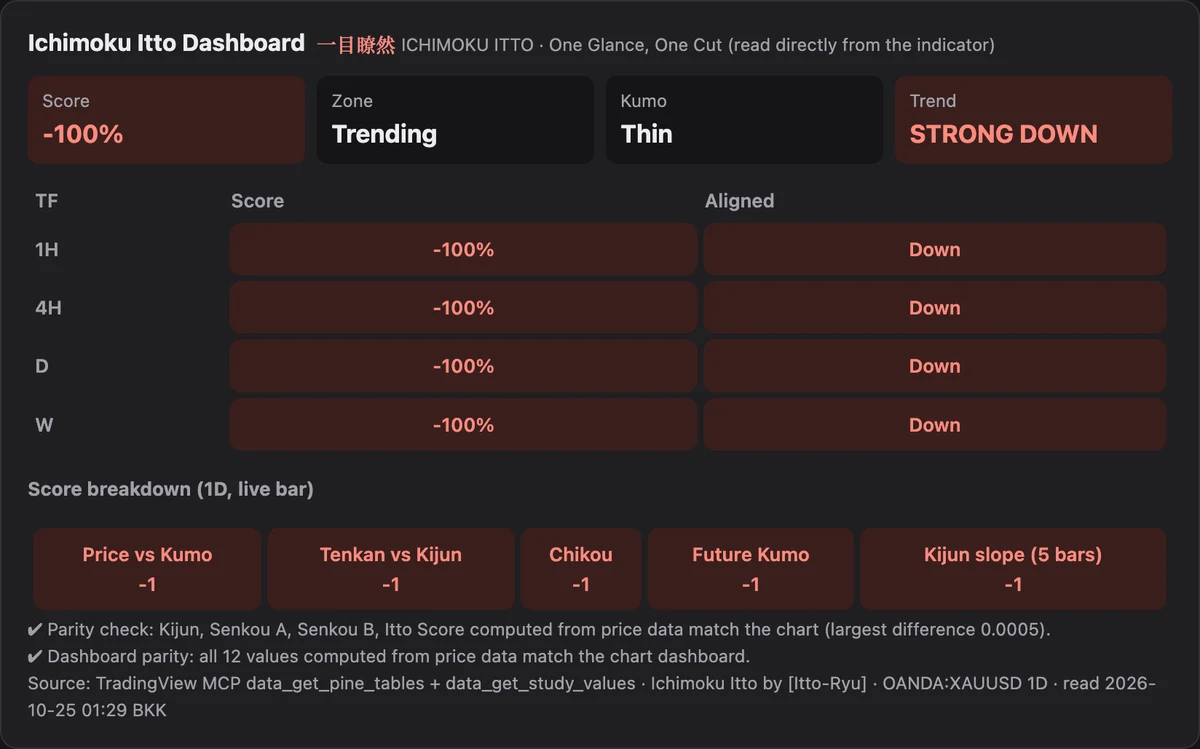
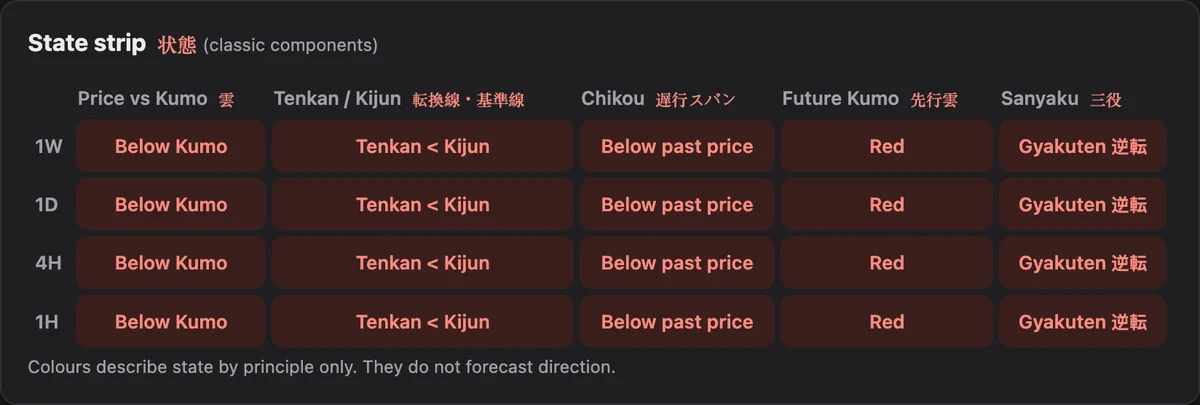
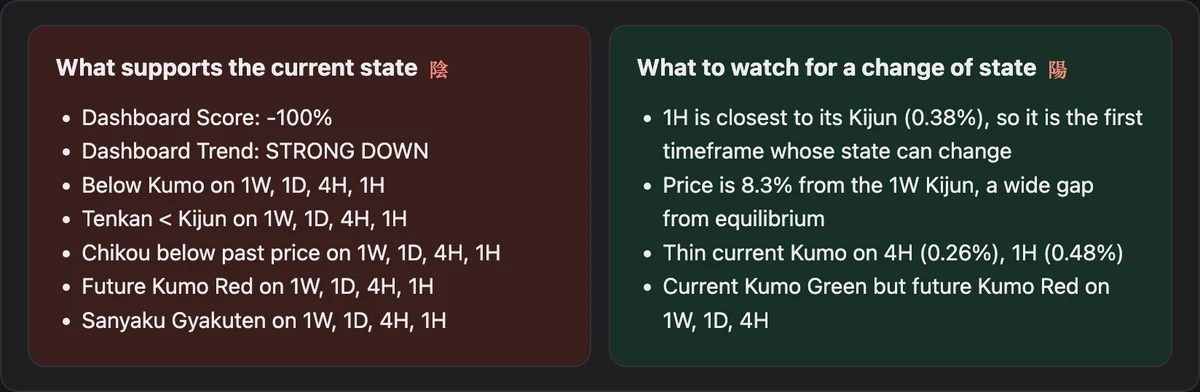
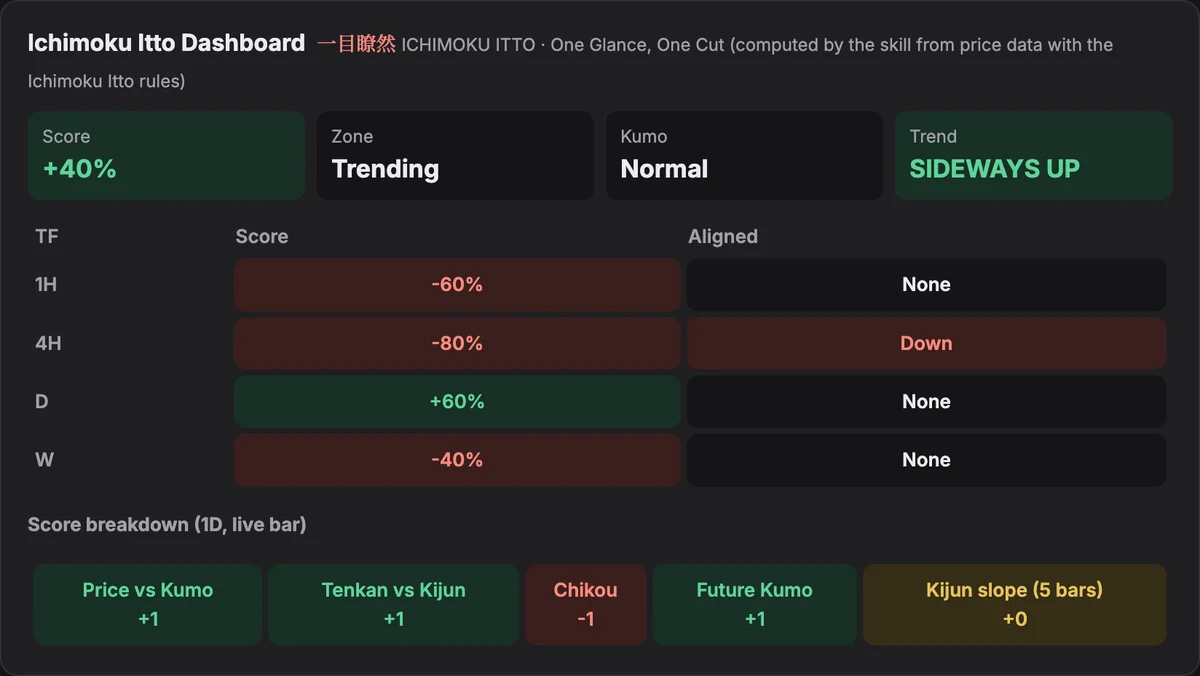
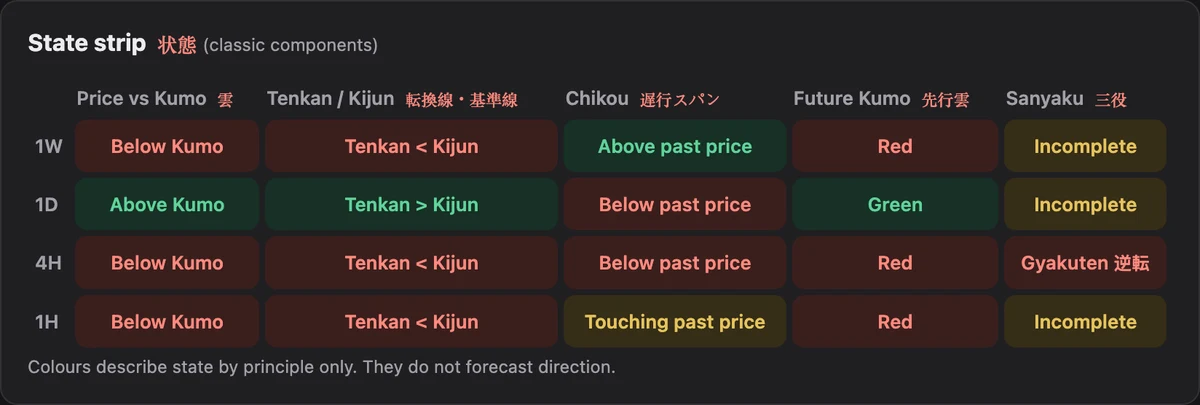
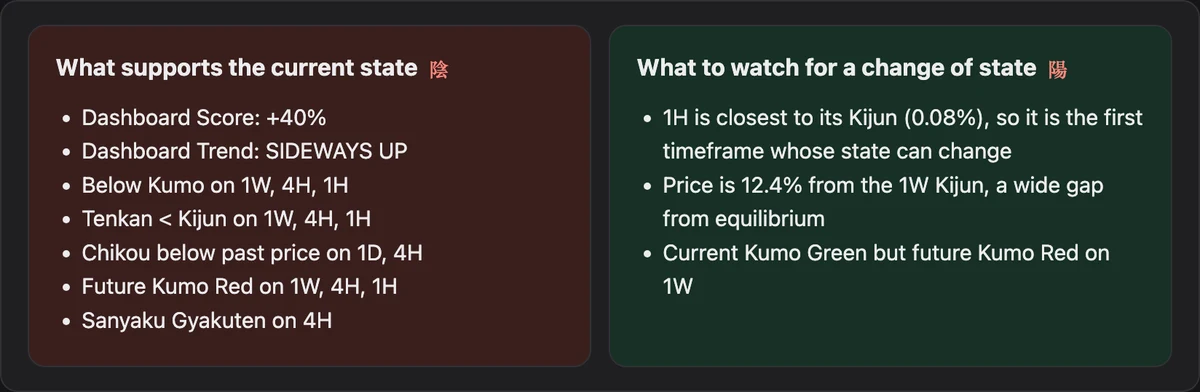
OANDA:XAUUSD · 1D · Classic · data through 23 Oct 2026 · Past data, illustrative only, not a trade idea. Price levels are cut out.
Mode badge and settings
Quick or Full, preset, timeframe, data date, and how to change them. Check this first.
Summary 総括
Whether the timeframes agree, and in which direction.
Dashboard
The Ichimoku Itto table, labelled computed, or read from the chart or image.
State strip 状態
One row per timeframe: Kumo, Tenkan/Kijun, Chikou, future Kumo, Sanyaku.
Price ladder 水準
Close, Tenkan, Kijun and Kumo edges on one scale.
Change points 変化点
Prices where a component changes state. Not trade levels.
Two sides 陽 · 陰
What supports the state and what would change it. It becomes "What to watch" in Chop or when timeframes disagree.
Learning 学び
One principle in plain words, tagged Classic or Itto.
Classic means standard Ichimoku Kinkō Hyō knowledge. Itto means the Ichimoku Itto rules, taken from the open-source indicator code. Print the page to PDF from your browser if you need a file.
User guide
Ichimoku Itto Read · User Guide
Everything on this page in a 9-page PDF: install, commands, modes, data routes, the report section by section, settings, troubleshooting and FAQ.
Settings file
config.yaml in the skill folder holds your defaults. Edit it before zipping, or simply say the setting in your request.
jp_accents: true          # Japanese terms next to English names
mode: quick               # quick | full
chart_tf: 1D              # timeframe for Score / Zone / Kumo / Trend
dashboard_tfs: [1H, 4H, 1D, 1W]
preset: Classic           # Classic | 5-Day Week | Crypto
indicator_inputs: {kijun_slope: 5, strong_threshold: 4, chop_band: 1, magnet_flat_bars: 8, magnet_keep: 6}
symbol_defaults:          # skip the exchange question
  XAUUSD: OANDA:XAUUSD
  BTCUSD: BITSTAMP:BTCUSD
html_report: truePDF · 9 pages · 295 KB · English
Troubleshooting
- The skill does not start
- Check it is switched on in Customize → Skills and that code execution is on, then start a new chat.
- "No data route available"
- Add the TradingView connector, or attach CSV exports or a screenshot.
- Numbers differ from my chart
- Check the symbol and exchange, the preset and inputs, and whether the bar is still forming. In Quick mode, Kumo class shows "— (full mode)".
- A ⚠ parity line in the report
- The real dashboard and the computed one differ. The report lists which values; check the symbol, preset and inputs.
- Upload error
- Upload the zip as downloaded, and do not rename the folder inside it.
Questions
- Does it give buy or sell signals?
- No. It reads state by principle. A built-in check blocks advice words before anything is shown, and every report ends with a disclaimer.
- Do I need TradingView Premium or the indicator on my chart?
- No. With the connector or CSV, the skill computes the dashboard itself. Add Ichimoku Itto on TradingView to see it and compare.
- Which markets work?
- Anything with OHLCV data: forex, metals, crypto, stocks, indices and futures.
- Is my data sent anywhere?
- The scripts run inside Claude's code environment and make no network calls. Price data comes only from the route you use.
This skill is an educational tool. It describes the state of technical indicators by principle and is not investment advice, a recommendation or a solicitation to buy or sell any instrument. Markets carry risk; past behaviour of an indicator does not guarantee future results. You are responsible for your own decisions.